|
|
| المطور |
Pollen Software |
|
| السعر |
19.95 - Shareware |
| الحجم |
1.67MB |
| الاصدار |
6.0.1
نسخة تحديث بسيط
|
نظام التشغيل Win95,Win98,WinME,WinNT 4.x,Windows2000,WinXP,Windows2003,Windows Vista Starter,Windows Vista Home Basic,Windows Vista Home Premium,Windows Vista Business,Windows Vista Enterprise,Windows Vista Ultimate |
التقييم
|
عدد مرات التحميل : 321 |
: تحميل البرنامج Autorun Maestro
|
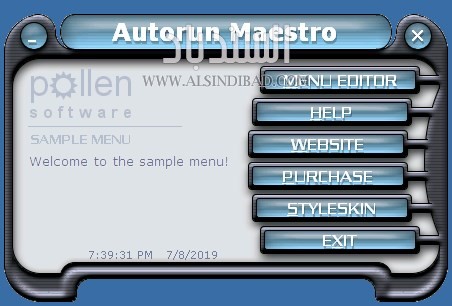
Autorun Maestro is highly configurable CD Autorun menu software. With a fully graphical interface, the Autoplay menus appearance and shape can be completely user configured with independently placed buttons, freely shaped forms, the ability to show the current time or date, skinnability and transparency, settable tab order and keyboard shortcuts, command searching, button animation and more.
|
|
|
| |
|
تقييم و آراء الزوار |
|
|
لا يوجد
|
| |
| برامج لنفس المطور
|
| |
AutoView
AutoView is a CD Autorun program designed to add convenience and professionalism to the CDs you create by having them launch a selected file after CD insertion. AutoView comes with a short wizard to set the program up for your own needs. Simply copy the provided Autorun.inf and files the wizard creates to your CD with your own files and your done. Its that simple! AutoView is commonly used with html, PowerPoint, PDF and other CD presentations.
|
| |
AUTOption
AUTOption is software to enable users to create professional autorun CD menus with minimal time and effort. AUTOption sports 15 styles of button placement animation, use of your own background image, minimize and exit controls, optional use of sub-menus and a formattable text area to display descriptive text when the mouse is held over a button. The user has the choice of a friendly wizard or using the Menu editor to make the menu.
|
| |
StyleSkin
Styleskin is dedicated template driven interface design software which enables anyone to easily design their own graphics. Simply layout your template using the provided shapes, choose your colors and style and almost instantly you have your very own unique skin. You could be designing a web site, a program interface or skin, creating your own menu application in our Autorun Maestro, promotional graphics, 3D text, 3D buttons...
|
| |
PhotoRemedy
PhotoRemedy Phone is digital photo correction software with intelligent correction algorithms and smart learning! It includes features to fix common problems that can occur in photos taken with mobile phones. The program automatically analyzes your digital photo and presents you with a correction for over exposure, under exposure, problems with brightness, saturation, contrast, white balance, hue, focus, noise reduction and dead pixel correction.
|
| |
AUTOption Graphic
AUTOption Graphic allows you to create an interactive Autorun/Autoplay menu application that gives a highly professional touch to your CDs. It creates impressive menus based on preset styles (16 Styles included) with your choice of color. The photo styles take your own photo or image and applies special effects to create your own personalized menu. It can be used to Autostart any file or program you can imaging placing on a CD/CDR.
|
| |
Autorun Action Flash
Autorun Action Flash is software for making striking Autorun/Autoplay CDs. This program is specifically designed to, after CD-ROM insertion, flash an image (static or animated) of your choice while launching a file. You control the image size, appearance time and location. The program is easy to set-up and comes with a wizard to make it even simpler. It has the ability to not show itself as well as pass commandline arguments to programs.
|
| برامج شبيهة
|
| |
AcceleRun Free
AcceleRun will run any of hundred installed programs during 2 seconds. Ergonomic design. Minimum memory usage. Ready to help you after first launch. Save your time for more important tasks!
|
| |
JetStart Free
Tired of digging into crowded Start Menu? JetStart offers you a quick access to categorized Start Menu shortcuts, recently launched programs and system commands. Just point your mouse to the Start Menu button! You can also place your most used programs and documents into the handy toolbar and quickly run any program by typing few starting letters. Reorder taskbar buttons by drag and drop!
|
| |
Launch Express
This small program makes a huge difference! Launch Express puts any program, document or folder only one click away! It works with special folders (which aren't really folders) like My Computer or Control Panel too! You do not need to browse through endless folders and scroll through files to find what you need. Simply press the system tray icon, Win+Q or mouse roller and click a program to launch or folder to open. As simple as that! Try it now!
|
| |
True Launcher
True Launcher is a simple, easy to use program launcher. True Launcher allows you to combine your shortcuts into groups, helps to free the desktop from numerous icons, folders, and files by moving them to the True Launcher start panel. This panel automatically hides when it is inactive and pops up when the user points to the area where it is located. Also you can start applications via tray menu and hotkeys.
|
| |
A Better Finder Launcher
A Better Finder Launcher provides instant access to all your applications, documents and folders.
|
| |
RLauncher
RLauncher is an easy to use application launcher. It is used to quickly launch applications, documents, and URLs with one mouse click and save your time. You can do it via main toolbar, tray menu, floating window, hotkeys and aliases. The software has Load at startup and Auto-hide options that should make your life even more easier. RLauncher is a free software and it does not contain any spyware.
|
| |
BeTrayed
BeTrayed! is a small 32 bit command line utility which allows you to easily add a collection of shortcuts to the System Tray (Notification Area in Microsoft speak) It allows you to quickly access frequently used folders, files, URLs and applications - even though they were never designed to be launched from the Tray.
|
| |
DeskLauncher
DeskLauncher is a Start Menu alternative. It lets you launch applications, documents, URLs immediately and easier using toolbar, tray menu, floating window, hotkeys or aliases. After installation DeskLauncher creates sample menu for you. Applications are added either through a dialog or by dragging from Windows onto the launch pad. The software has Load at startup and Auto-hide options that should make your life even more easier.
|
|
|